Good shift planning brings order to full weeks and creates space for life outside of it. With ShiftPlanner24 you organize your team, working hours and days off in a clear interface. Create your shift schedule directly in the browser, adjust assignments flexibly and see at a glance who is working when.
Applications, availability and shift exchange in one place.
Times & Staffing
Time tracking, hourly accounts, automatic scheduling, locations & qualifications.
Also on the go
Calendar subscription, notifications and mobile web app.
Export & data backup
PDF, CSV payroll export and backup and restore.
Test start with email confirmation.
Can be canceled monthly after booking at the end of the paid period.
PLANNING THAT FEELS GOOD
A digital shift planner. Less back and forth.
A roster should make decisions easier. That's why ShiftPlanner24 combines a colorful weekly overview with understandable functions for your everyday work. In the demo, you start with a sample team and try out functions without registering. You sign up for your own team plan. You switch between weeks, keep track of different tasks and can make changes directly where you see them in the plan.
01 / PLANNING FLEXIBLE
Create a roster and change it flexibly
Click on a free field, select a team member and set the start and end. On the computer, you can move a work shift using drag-and-drop. If you change staffing, the shift planner checks time overlaps and registered absences. This way you will receive a direct notification if a person has already been scheduled. The assignment to another person can also be changed. Your notes contain additional information about the respective mission in one place.
Morning shift always starts at the same time for you? Save the usual working hours as a work shift template and apply them when you create them. You can edit templates or create additional variants. Individual times are possible at any time. This means that your roster adapts to actual processes, even if individual working days fall out of the usual pattern. A template sets the times. You continue to determine the specific staffing and date yourself for each new work shift.
Early shift06:00 – 14:00
+
Create once. Reuse.
03 / THINK TOGETHER
Employee planning with a clear overview
Manage names and uses in one place. Filter the weekly schedule by an area or work shift type if you want to focus on a specific task. The team overview shows planned work shifts and hours per person. This makes it easier to coordinate your planning, especially if several work areas need to be occupied at the same time. A sensibly named area makes the overview immediately easier to understand. Choose terms that your team knows from their everyday work.
L.FNWMSFRI
ServiceKitchenBar
YOUR EXAMPLE WEEK
40hScheduled hours
MON
TUE
WED
THU
FRI
SAT
SUN
Open space planned.Time for you.
WORKING HOURS. LEISURE TIME. OVERVIEW.
Plan working times and keep track of hours
How many hours are planned for the week? ShiftPlanner24 adds up the duration of your entered work shifts. You can see the total hours as well as the planning of individual team members. These are planned working times, not recorded attendance times. Breaks are not automatically deducted. Use the numbers as a basis to consciously check your weekly plan and adjust it if necessary.
Take vacation and absences into account
A good shift schedule also shows when someone is not available. Enter vacation, illness or compensatory time off for a period of time. The absence appears in the weekly schedule and is taken into account for new work shifts. You must first move or remove existing assignments. This makes it clear which staffing is actually suitable for your plan.
FROM THE FIRST CLICK TO THE WEEKLY PLAN
Create your shift plan in three steps
You don't need a long training period to get to know the most important functions. Start with a week and develop your own planning process from there.
01
Create team
Open the team administration, add names and assign each person an area of operation. Our demo will help you understand the structure. You can edit existing entries and add additional team members.
02
Distribute work shifts
Choose the appropriate week and enter your work shifts. Use templates for recurring times, add individual notes and take days off into account. Then check whether staffing and time periods suit your requirements.
03
Check and export weekly plan
Check your plan as a week, month or daily list. Download it as PDF or CSV. For recurring assignments, you can copy weeks or enter a shift rhythm based on a preview.
AS VERSATILE AS YOUR EVERYDAY LIFE
Roster planning for people who pitch in.
Shift work doesn't look the same everywhere. With freely selectable areas and times, you can map different deployment plans. The following examples show how you can structure your planning.
Shift planning in the catering industry
Service, kitchen and bar have their own rhythm. Assign your team to the appropriate areas and keep an eye on early shifts, evening shifts and days off side by side.
Service plan for care and support
Early shift, late shift and night shift can be clearly distinguished. Enter absences early and check the planned working hours. You assess the technical staffing requirements yourself.
Operations planning in retail
Whether sales, checkout or warehouse: areas help you structure the weekly plan. With a filter you can focus on the part of your team that you are currently planning.
Shift calendar for production and service
Create frequent shift times as templates and add different assignments individually. Night shifts throughout the day remain understandable through start time, end time and clear color coding.
BIG OVERVIEW. SMALL SCREEN.
Your online shift planner. Even on the go.
On the large screen, the weekly overview offers space for your entire operational plan. A compact daily list opens on the smartphone. The monthly view shows longer periods. The demo only saves changes in the current tab of your browser. With registered team access, you can use the same server location on multiple devices. Administrators manage access, those responsible for planning edit the shared plan and employees see their own work shifts. Your local data remains separate. After a preview, you can use the data management to add them to the shared workspace.
✳
ShiftPlanner24.
YOUR WEEKLY PLANHello, new week.
MON16TUE17WED18THU19FRI20
Tuesday, November 17th EXAMPLE
Early shiftLena · Service
06:0014:00
Late shiftMia · Service
14:0022:00
Night shiftFinn · Bar
22:0006:00
CLEAR QUESTIONS. CLEAR ANSWERS.
Frequently asked questions about digital shift planning
?
Is registration necessary?
The demo works without registration. For shared shift schedules, register your team and confirm your email address. You then invite employees and grant them access rights.
Will my shift plan remain saved?
Yes. When you are logged in, your plan remains saved on the server for you. Under “Backup & Data” you can download full backup files and restore them after a check.
Can I export a roster?
Yes. Download the filtered weekly plan or monthly plan as a PDF or use CSV for your spreadsheet. The full JSON backup additionally includes team members, templates and absences.
✦
MORE CLARITY STARTS WITH ONE CLICK
Your next week deserves a good plan.
Start now with ShiftPlanner24, discover the weekly overview and get your shift planning into a clear rhythm. Open the planner and try out your first week at your leisure.
Shift planner and duty planner: more overview for your everyday work
Monday morning, the first sick note comes in and at the same time someone needs Friday off. Anyone who divides teams knows such situations. A good shift planner helps you keep track of things and implement changes in a targeted manner. With ShiftPlanner24 you bring together working hours, team members and absences in a digital roster. You can see how your week is structured and adjust stakes. This turns many individual agreements into a plan that you can work with in everyday life.
A common roster instead of many individual lists
A table can be created quickly. However, as soon as several people agree on changes, slightly different versions emerge. An online duty planner bundles planning in one place. After registering, you will work with your team's shared status. Administration and planning have different permissions; Employees see their own work shifts and absences. This means it remains clear who is allowed to plan and what information is intended for each person.
The advantage is particularly evident in short-term adjustments. You edit the relevant assignment in the shift planner and then check the new distribution. Names, times and notes are together. This makes queries easier because you can refer to a specific entry.
Before your team works with a new period, you publish the planned status. Changes to the planning will only be visible to employees after publication. Therefore, agree on a fixed time for release and a clear path for questions. This routine helps to avoid misunderstandings about the valid plan, especially when services change.
Create working layers and select the appropriate view
For your initial planning, you create team members and areas of operation. Then you choose a day, assign a person and enter the start and end. Early shifts, late shifts and night shifts can be distinguished by color. On the computer you can move existing work shifts using drag-and-drop. The shift planner takes time overlaps and recorded absences into account.
The weekly view helps with specific staffing for the next few days. In the monthly overview you can see longer connections, while the list view shows individual assignments in a compact manner. Use filters to narrow down your view. For example, you can look specifically at the service area without having to work your way through the entire roster.
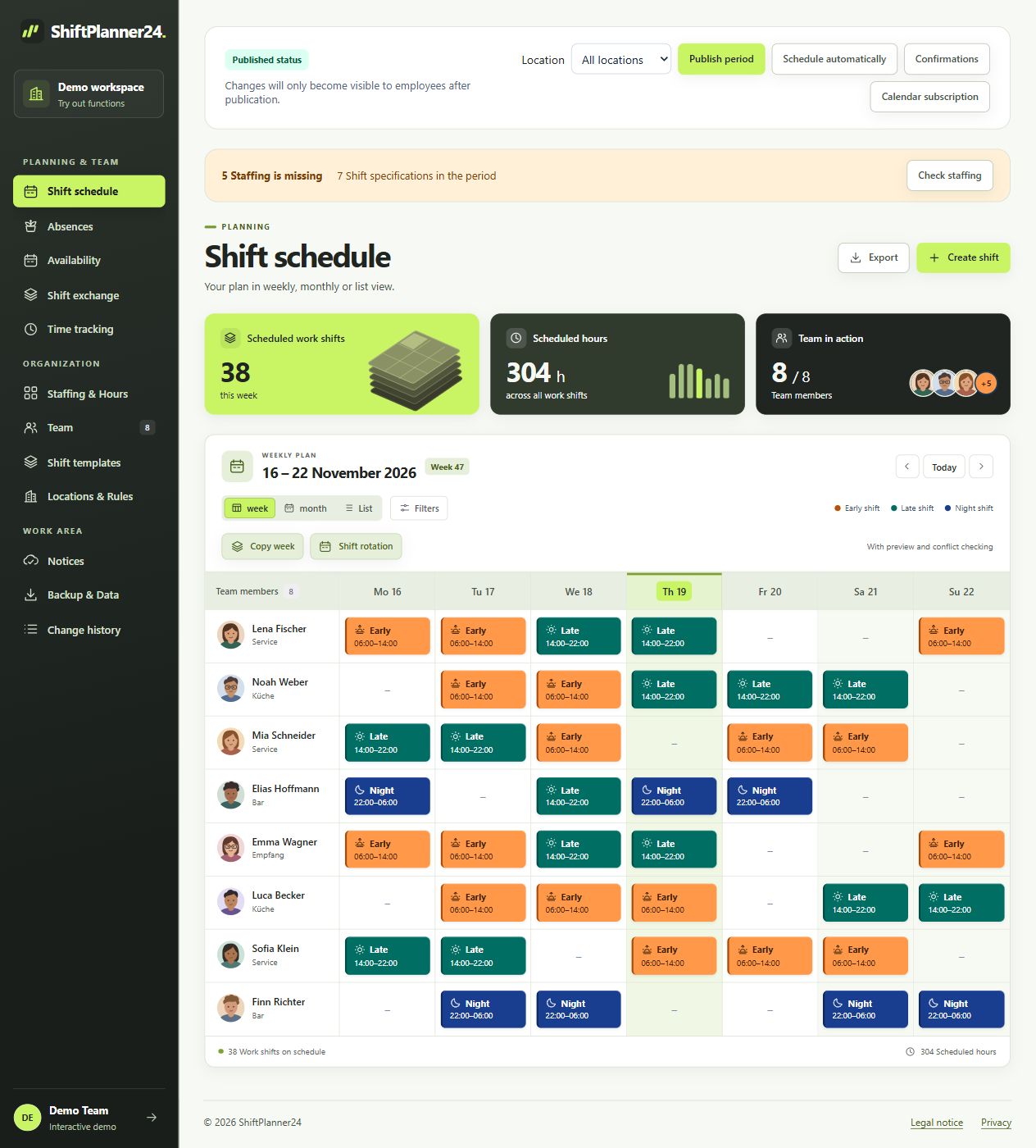
The weekly view in the shift planner: here filtered by service area, with fictitious demo data. Click to enlarge.
Plan faster with templates and shift rhythms
Many work weeks begin with similar time windows. The roster planner offers you work shift templates for this: you save frequently used times and use them when creating new assignments. Different times remain possible. A template saves you from repeating entries without committing to a rigid process. Name your templates so that other people planning them can understand them immediately.
If entire weeks repeat, you can copy a week. The shift rhythm is available for regular sequences of early shifts, late shifts, night shifts and days off. Before taking over, you check a preview. Nevertheless, check the actual staffing: A recurring pattern is the starting point, while holidays or special dates require individual adjustments.
Prepare recurring work shifts: select the period, rhythm and team members directly in the tool. Click to enlarge.
Take vacation and availability into account in good time
A complete roster also shows when people cannot work. In the shift planner you record absences such as vacation, illness or compensatory time off. Applications and vacation accounts help you include free time in your planning. If there are already work shifts in the desired period, these must be postponed or removed accordingly. In this way, an absence remains coordinated with the actual operational planning.
In addition, availabilities can be stored according to days of the week and time windows. This is helpful if part-time workers or temporary workers can only be deployed at certain times. The sooner you collect this information, the more targeted you can be in distributing services. The duty planner provides an overview; Coordination with your team remains important.
Vacation and absences at a glance: Original view from the demo with fictitious people and requests. Click to enlarge.
Keep an eye on planned hours and staffing
When it comes to duty scheduling, not only the number of work shifts but also their duration counts. ShiftPlanner24 totals planned hours and makes the distribution within the team visible. This will help you recognize if a person takes on a lot of long shifts or if the weekly planning seems unbalanced. Use this overview to clarify open questions before publication and to distribute assignments differently if necessary.
Planned working hours describe the periods entered; they are not automatically recorded attendance times. Breaks are not automatically deducted from this amount. You also check the technical requirements for staffing yourself. A shift planner supports decisions with clear information, while you incorporate experience, team agreements and operational requirements into the planning.
View and export your roster on the go
An online shift planner is practical when planning does not always take place at the same workplace. ShiftPlanner24 runs in the browser and offers views for different screen sizes. You can prepare your plan on the computer and see what missions are coming up as you go. You register for your own workspace; The demo can be tried out without registering.
If you need a file for the meeting or a notice, export the selected period as a PDF or CSV. The output takes your filters into account. There is also a JSON export for complete backup of the planning data. Before sharing, think about what information the recipients need and choose the appropriate excerpt.
The overview connects open staff positions with the hourly accounts of the fictitious demo team. Click to enlarge.
A roster planner for different teams and industries
In a restaurant, kitchen and service have to go together; in retail, sales and cash registers have to go together. There are additional requirements in care, support or production. With freely named areas, your own work shift templates and individual times, you can adapt your roster to such processes. What is crucial is a structure that your team understands and uses consistently in everyday life.
Start manageable: define clear areas and use consistent names. Then check which filters and views make your planning easier. You can find further examples for different areas of application on our industry pages. The shift planner creates a common basis, even if working hours, team size and organizational tasks vary from company to company.
Try out the shift planner and find your routine
The best way to get to know a roster manager is on a specific week. Open the demo, move an assignment, change the view and look at the absences. The people and data shown are fictitious. You can then create your own workspace and start working with your team. After the first week, take time for feedback: What information is missing, what templates help and where do you need clearer agreements? In this way, you can develop a shift plan step by step that fits your everyday work routine.
It's worth taking a quick look at the coming week together: Are all assignments clearly named, days off taken into account and important information entered? With this habit, your roster remains easy to understand, even when changes occur.
Manage team members and their areas together. The demo uses service, kitchen, bar and reception as examples. Click to enlarge.
 ShiftPlanner24.