Plan kitchen, service and bar together
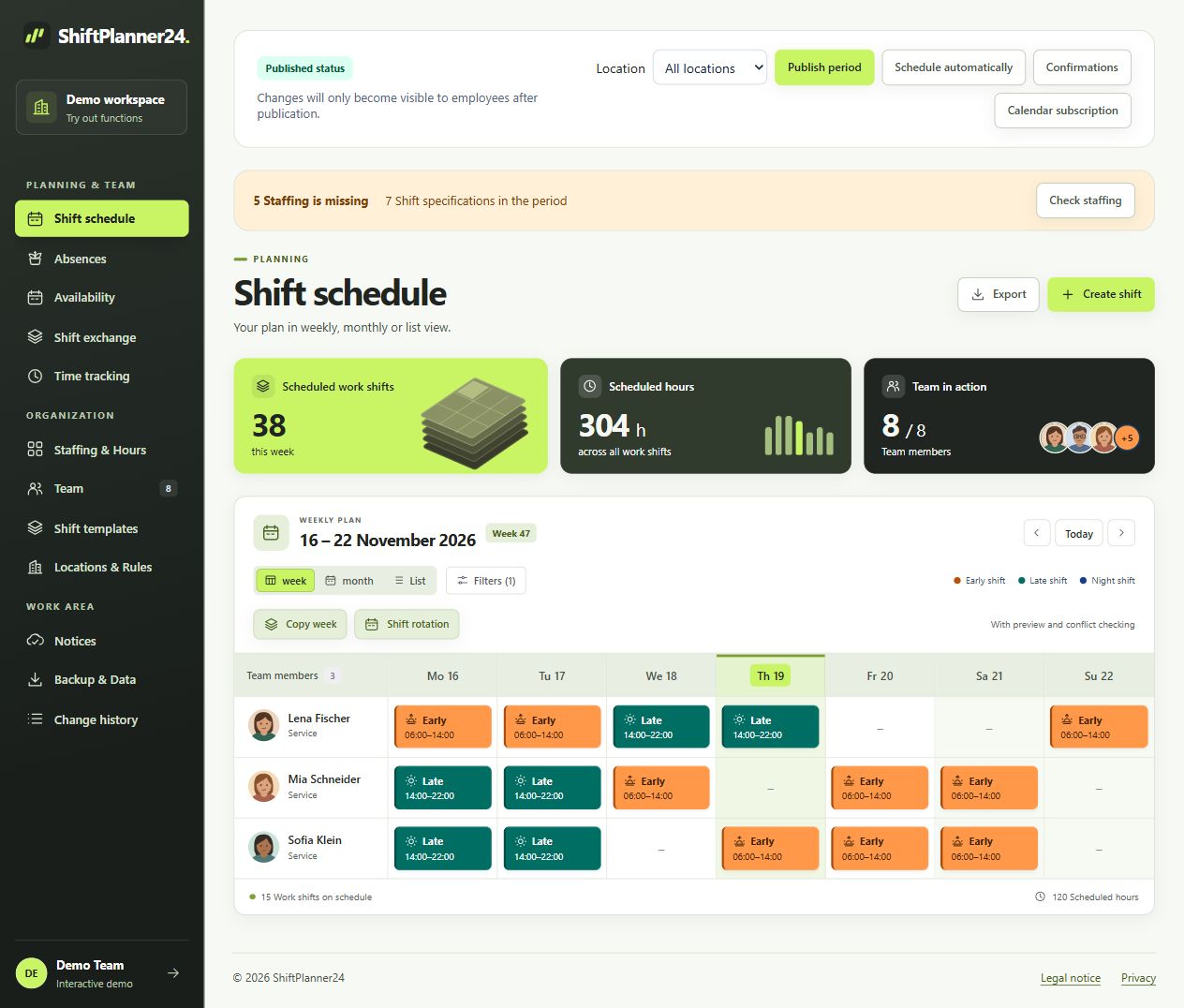
A roster for the catering industry begins with the tasks on site. Who prepares the kitchen, who takes care of the terrace and who closes the bar? Create comprehensible areas for this. Your employees can be assigned to these areas, while filters keep the respective planning clear. You save frequent times as work shift templates. You can still enter individual working times for a banquet or an earlier delivery date.
Also consider the transitions: preparation, actual service and completion rarely coincide completely. A shift schedule for catering should make this work visible. Plan the necessary staffing based on your processes and then check whether experience and responsibilities are distributed sensibly.
Take peak times and temporary workers into account
You may need more support on Saturday evening than on Tuesday afternoon. Store your staffing needs by time period and area instead of copying the same staffing every day. Reservations, events and known peaks provide operational clues. Add temporary workers where they are needed and take the available availability into account when scheduling them.
A catering roster remains a conscious decision by the responsible person. Rule-based planning suggestions can take needs, qualifications, wishes and hour distribution into account. You first see the suggestions in a preview and check them before adopting them. Even an automatically prepared plan needs to be compared with your actual day-to-day business.
Collect availabilities before planning
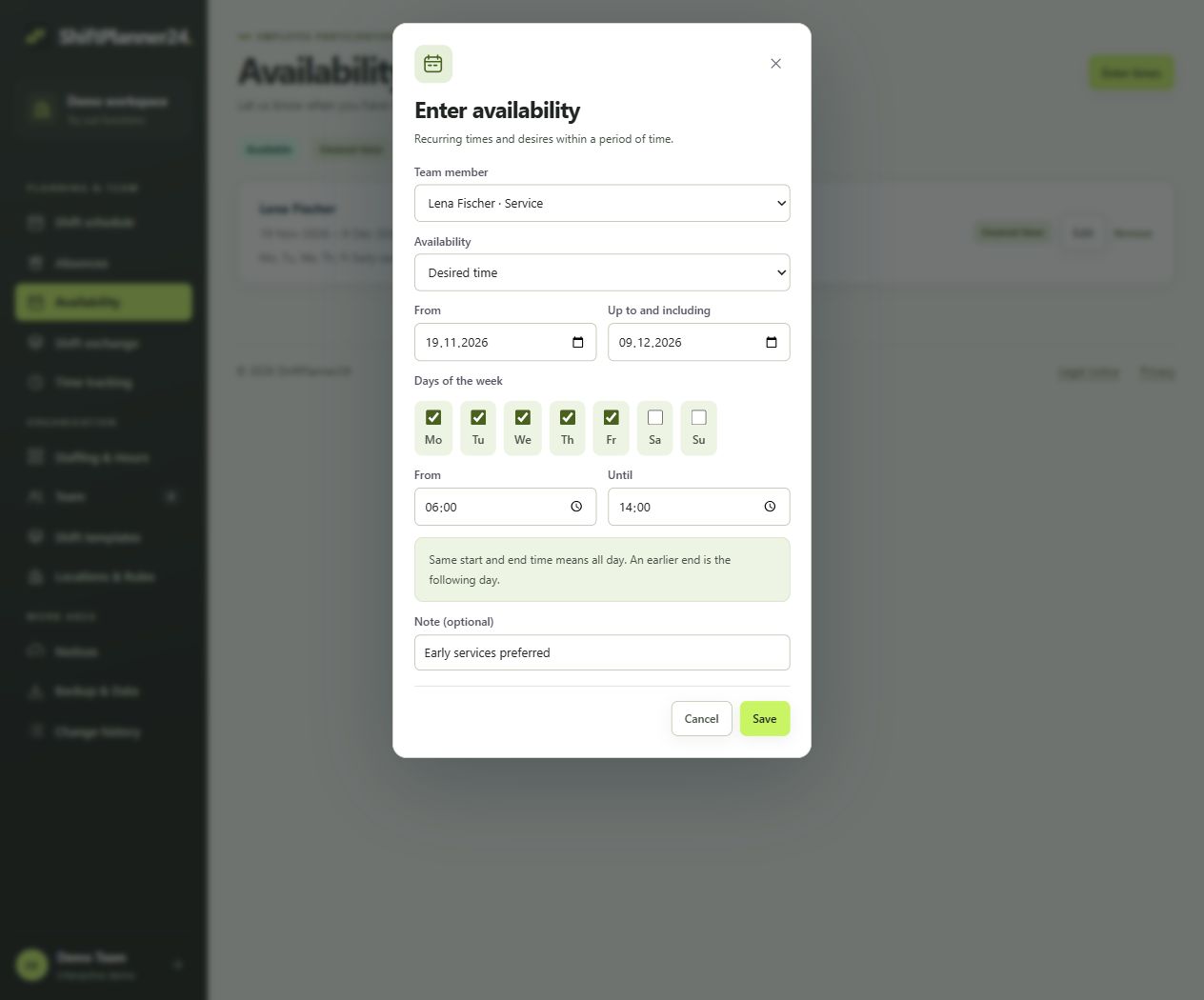
Anyone who studies, looks after children or works part-time cannot be employed at will. Employees can enter their availability and preferred times, including recurring for certain days of the week. This gives the planning a common basis. Approval or rejection applications are available for leave. Registered absences help you to identify unsuitable staffing early on.
Agree within the team on a comprehensible process for new requests and changes. A request is not yet a confirmed work shift and a vacation request is not yet an approval. If these differences are known, the roster can be better coordinated in everyday catering. The software maps the process; your company agreements make it binding.
Use the roster app for catering on the go
After work, no one should have to stop by the restaurant to check on their own work. Employees can access their published work shifts on their smartphone via personal access. ShiftPlanner24 runs in the browser and can be installed as a web app. An additional native app from an app store is not required for this access.
The roster app for catering also supports notifications and personal calendar subscriptions. This means the plan remains accessible even outside of the company. A calendar subscription takes published personal work shifts; When changes appear depends on the polling interval of the calendar service used. For short-term changes, check the current plan and use the agreed communication channels.
Solve failures and shift swaps in a comprehensible manner
Reporting sick shortly before evening service requires a quick decision. First check which task remains unfilled and which available person is suitable for it. Open services can be offered via the shift exchange. Handovers and mutual shift swaps have their own process with the necessary approvals and approval from planning.
This means that an exchange remains more than just a message in the group chat. Before taking over, the application checks, among other things, collisions, unavailability and stored limits. You continue to assess the appropriate staffing and the actual operational requirements yourself. After approval, the team should be able to access the same published roster.
Connect roster and time recording
Planned work shifts and actual work performed are two different variables. An earlier end of work, a longer event or a break change the recorded working hours. With time clock, manual corrections and approvals, you record actual times separately from the original plan. Hourly accounts then show how approved times and agreed target hours interact.
A clear review process is important for your roster with time recording. Decide who completes incomplete entries and checks corrections. Breaks are not automatically deducted. The general CSV wage export supports further processing of released times; You should not derive a direct connection to your payroll software from this. Check the exchange format with the responsible authority.
A sample week for your catering roster
For example, start with a week in which longer opening hours apply on Friday and Saturday. First, set the shift times for preparation, lunch and evening. Then add the kitchen, service and bar requirements. Take confirmed vacation and available temporary workers into account before assigning specific people. Such a sample week is a working aid and not a general personnel requirement.
Review the draft together with those responsible. Do handovers and days off work? Are all areas taken into account? After publication, employees can confirm their plan. You use the copy function for similar weeks and then check holidays, events and absences again. Reuse saves input, but does not replace this check.
Also imagine an evening with a larger registered party. Additional service only helps if the kitchen and bar can process orders as planned. Therefore, consider the areas together. A quick consultation before publication can clarify who will receive guests, who will need longer handoffs, and who will handle the closing. After the evening, compare the planned process with the actual times recorded. From this you will gain concrete information for the next similar event.
Create the first roster online
If you have been creating your roster using Excel, start with a manageable team and a clear time period. Transfer the required master data, create appropriate templates and compare the finished week with your previous process. PDF and CSV exports help with sharing and checking. A complete JSON export of the planning data is also available for data backup.
In the demo you can get to know the catering shift planner with fictitious data. You register for your own workspace and confirm your email address. Afterwards, 30 free trial days begin. The paid continuation costs 19 euros per month including VAT and requires an explicit booking. No payment details are required when registering. Use the test phase for a real planning process and then collect feedback from the kitchen, service and bar.